The Site Was Up. It Just Wasn’t My Site.
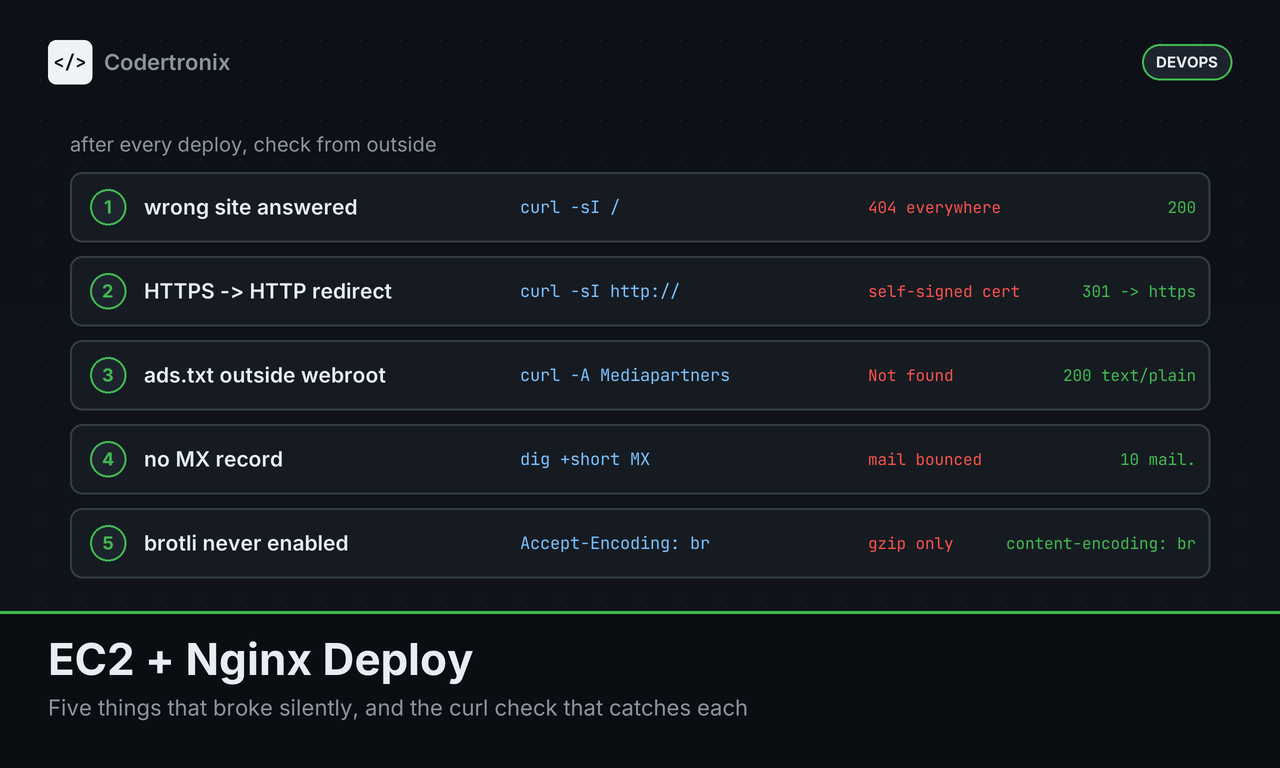
This site is plain HTML served by nginx on one EC2 instance. No framework, no build step. That sounds like the easiest deploy there is, and it mostly was. These are the five things that still went wrong, in the order I found them.
None of them threw an error. Every one looked fine from the server, and was only visible from outside.
1. The Wrong Site Answered
The first time I checked codertronix.com from outside, it showed a control panel’s welcome page: “Success! Your new web server is ready to use.” The server was running. My files were not what it was serving.
Every real URL returned 404. Not just posts: /ads.txt, /robots.txt and all three sitemaps too. To a crawler, the domain was an empty server.
The check that catches this takes ten seconds:
for p in / /ads.txt /robots.txt /sitemap.xml /feed.xml; do
  printf '%-14s ' "$p"
  curl -sS -o /dev/null -w '%{http_code} %{content_type}\n' "https://codertronix.com$p"
done
Every line should say 200 with the right content type. Run it after every deploy, from a machine that is not the server.
2. HTTPS Redirected Down to HTTP
The certificate on port 443 was self-signed and issued to an internal AWS hostname (ip-172-31-35-101.ap-south-1.compute.internal), not the domain. Worse, HTTPS answered with a 301 down to plain HTTP. Browsers showed a security warning before they got anywhere.
The fix was one certbot run covering both names. www has to be on the certificate too: it resolves to the same server, and without it HTTPS on www fails before nginx ever gets to redirect it.
sudo certbot --nginx -d codertronix.com -d www.codertronix.com --redirect
sudo nginx -t && sudo systemctl reload nginx
Then confirm the redirect goes the right way:
curl -sI http://codertronix.com/ | grep -i location
# Location: https://codertronix.com/
3. ads.txt Lived Outside the Site Folder
My nginx config serves /ads.txt from /var/www/shared, not from the site’s own folder. That keeps one copy for http, https and www, and lets ads.txt answer on plain HTTP with no redirect at all, so crawlers never have to follow a 301 to find it.
The catch: a normal deploy copies the site folder, so it never touches /var/www/shared. Skip that one install step and /ads.txt 404s even though the deploy “worked”.
sudo install -m 0644 -o www-data -g www-data ads.txt /var/www/shared/ads.txtAdSense only rechecks ads.txt now and then. Its dashboard kept showing “Not found” from a check on 21 August until it looked again on 28 October and switched to “Authorised”. Fixing the file does not fix the dashboard right away, so test it yourself, as the crawler:
curl -s -A "Mediapartners-Google" -o /dev/null -w '%{http_code} %{content_type}\n' https://codertronix.com/ads.txt
curl -s -o /dev/null -w '%{http_code} redirects=%{num_redirects}\n' http://codertronix.com/ads.txt
4. Every Email Address Bounced
The site lists contact@, ads@, dmca@ and admin@ on its contact page, in the privacy policy and in security.txt. The domain had no MX record, no SPF and no DMARC. Every one of those addresses was undeliverable, including the one the privacy policy gives for data requests.
Nothing on the website shows this. You only find out when someone tries to write to you. Check the DNS directly:
dig +short MX codertronix.com
dig +short TXT codertronix.com
dig +short TXT _dmarc.codertronix.com
Today those return an MX record, an SPF record (v=spf1 mx -all) and a DMARC policy. Before, they returned nothing.
5. Brotli Was Installed and Never Turned On
Every HTML, CSS and JS file on this site ships with a pre-compressed .br and .gz copy next to it. The Brotli module was installed and loaded on the server. But the one line that tells nginx to use those files was still commented out:
# brotli_static on; # uncomment if ngx_brotli compiled inSo nginx sent the gzip copy to every browser, and the .br files sat on disk unused. Nothing broke. Pages were just bigger than they needed to be.
The fix was uncommenting that line, then testing and reloading:
brotli_static on;sudo nginx -t && sudo systemctl reload nginxThe difference, measured on this site:
| Page | Uncompressed | gzip | Brotli |
|---|---|---|---|
| Homepage | 38,259 bytes | 8,885 bytes | 7,249 bytes |
| Nginx tutorial | 64,970 bytes | 17,474 bytes | 14,162 bytes |
About 18–19% smaller than gzip, for one line. Check which encoding you actually get:
curl -s -o /dev/null -D - -H 'Accept-Encoding: br' https://codertronix.com/ | grep -i content-encoding
# content-encoding: br
What I Check After Every Deploy Now
The pattern in all five: the server was happy, nginx -t passed, and the problem was only visible from outside. So the checks run from outside too.
- Every key URL returns 200 with the right content type.
- HTTP redirects to HTTPS, never the other way, and the certificate covers www.
- ads.txt returns 200 to the AdSense crawler, with zero redirects on HTTP.
- MX, SPF and DMARC records exist for every address the site publishes.
- A browser asking for Brotli gets
content-encoding: br.
None of these needs a monitoring service. A shell loop, curl and dig cover all of them. For the nginx setup itself, see the nginx configuration guide.


